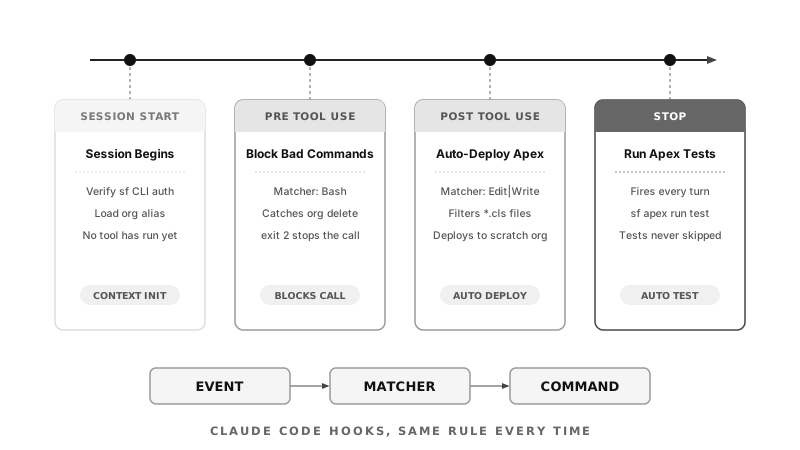
The core concept: hooks are user-defined event handlers that fire at specific lifecycle moments such as SessionStart, PreToolUse, PostToolUse, and Stop and they execute every single time their conditions are met, regardless of what the AI "decides" to do.
Think of them like Apex Triggers but for your Claude Code session. A trigger doesn't politely ask a record to validate itself before insert, it just runs, deterministically, on every transaction that matches. Hooks work the same way. They aren't a suggestion buried in a system prompt that the model might forget mid-task, they're shell commands that execute on schedule, full stop.
Why This Matters for Salesforce Developers
Salesforce work has a higher blast radius than most software. A bad sf org delete, a metadata deploy that wipes page layouts, a data load run against the wrong org alias these aren't typos you fix with git revert. Sometimes they're an afternoon of cleanup. Sometimes the data just doesn't come back.
At the same time, Claude Code is increasingly trusted to run real commands against real orgs: deploying Apex, executing anonymous scripts, running CLI operations that used to require a human pausing to think "should I actually run this?" An AI assistant moving fast through a task doesn't reliably pause that way. It runs the obviously-next command, even when "obviously right" and "actually safe" quietly diverge.
Hooks close that gap without making the model any smarter. Instead of writing a longer system prompt asking Claude to "please be careful with destructive commands," you write the rule once, as code, and it applies to every session and every teammate, forever, with zero reliance on anyone remembering. That's the same shift Salesforce architects already made years ago: replacing tribal knowledge ("don't touch that profile, ask Dave") with validation rules and permission sets that can't be talked out of enforcing themselves.
Hooks also shorten Salesforce's already slow feedback loop. Deploy-then-test cycles against scratch orgs are normally a manual, multi-step chore. Automating the boring half, deploy on save, test on stop, means your attention goes to the diff, not to remembering to run sf project deploy start for the fifth time today.
Three Hooks, in Order of Importance
1. Block dangerous SF CLI commands (PreToolUse)
A PreToolUse hook that exits with status 2 stops the tool call entirely, before it ever reaches the CLI. Wire this up against sf org delete or other destructive commands, and Claude can never run them, no matter how the conversation got there or how confident it sounds.
{
  "hooks": {
    "PreToolUse": [
      { "matcher": "Bash", "command": "scripts/block-dangerous-sf-commands.sh" }
    ]
  }
}
The script greps the incoming command for patterns like org delete or data:tree:import --plan prod, exits 2 on a match, 0 otherwise. Boring and exactly what you want from a safety net.
2. Auto-deploy Apex on save (PostToolUse)
Fires after every Write or Edit call. Match on .cls so it only triggers for Apex classes, and the changed class deploys straight to your scratch org, no manual sf project deploy start between every edit Claude makes.
{
  "hooks": {
    "PostToolUse": [
      { "matcher": "Edit|Write", "command": "scripts/deploy-changed-apex.sh" }
    ]
  }
}
3. Run Apex tests after every response (Stop)
Fires when Claude finishes a turn, not after every tool call. This guarantees the test suite actually runs when a task wraps up, instead of relying on Claude, or you, to remember to ask for it.
{
  "hooks": {
    "Stop": [
      { "command": "sf apex run test --target-org scratch --result-format human" }
    ]
  }
}
The Mental Model: Event → Matcher → Command
Every hook above follows the same 3-part formula:
- Event — the lifecycle moment:
SessionStart, PreToolUse, PostToolUse, Stop.
- Matcher — an optional regex filter that narrows when the hook fires. Match only
Bash calls, or only Edit|Write, so it doesn't fire on every single event in the session.
- Command — the shell command that actually runs, whose exit code Claude Code respects.
Once that formula clicks, writing a new hook is mostly a matching exercise: pick the moment, narrow the trigger, write the script.
One Important Safety Note
Hooks run with your full user permissions. There is no sandbox. A misconfigured hook can delete files, expose secrets, or execute arbitrary code just as easily as a well-configured one protects you from a destructive command.
Keep them small and explicit. A hook script should do one obvious thing, fail loudly, and be readable in thirty seconds, because it's going to run unattended, every single time, with nobody double-checking it first. For a Salesforce org where one bad command can touch production-adjacent data, that discipline isn't optional, it's the whole point of adding hooks in the first place.
Where to Start
Don't try to hook everything on day one. Start with the PreToolUse block on destructive SF CLI commands, since it's pure downside protection and has no workflow cost. Once that's running and you trust it, add the PostToolUse deploy hook to tighten your inner loop, then the Stop test hook once you're confident the first two behave the way you expect. Three small, well-understood hooks beat one clever one you have to debug under pressure.