"Simplicity is the ultimate sophistication." — Leonardo da Vinci
This website looks like three pages and a blog. You click around, read a post, maybe toggle dark mode. Sound Simple, correct ?
HLet me give you a peek under the hood, there's a surprising amount of machinery running just to make that simplicity possible. It was an upfront task to set it up the platfor but now it's easier to manage as I add more and more content.
Here's what's actually going on.
What Visitors See , Black , White and Grey Colors only
The public-facing site is deliberately minimal using black, what and grey colors only:
- Homepage — A hero statement and a list of blog posts
- Blog post pages — Title, date, tags, and the post body
- About — A short bio and contact info
- Archive — All posts in one place
That's it. No JavaScript-heavy interactions. No dashboards. No user accounts. Just reading.
The design is riduculously minimalistic , the pages load fast, and there's no flash when you toggle between light and dark mode. It feels like a site that "shouldn't" take long to build.
And that's the point.
What's Actually Running under the hood
Every page you visit is the tip of a content pipeline, a build system, and an infrastructure layer that handles everything from SEO to text-to-speech.Let me walk you through core building blocks
1. Next.js 16 with Static Export
The entire site is built with Next.js using the App Router. But unlike most Next.js sites, it uses output: 'export', which means:
- Every page is pre-rendered to static HTML at build time
- No Node.js server is needed in production
- The output is just files, deployable anywhere
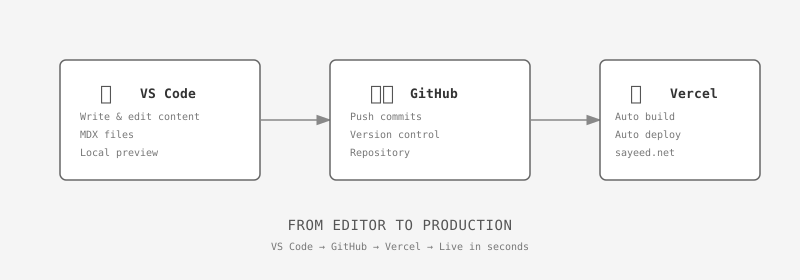
This is a deliberate choice. I don't want to manage servers, databases, or runtime environments. I want to write a post, run npm run build, and push files to a host via vercel pipeline build.
2. The Content Pipeline
Blog posts aren't stored in a database. They're .mdx files in a folder (src/content/posts/). Here's what happens when you add one:
- Create an
.mdx file with frontmatter (title, date, excerpt, tags)
- At build time,
generateStaticParams reads the file and generates a route
gray-matter parses the frontmatterreading-time calculates how long the post takes to readnext-mdx-remote renders the MDX content as React components
The result? A fully static page that behaves like a dynamic one, but was generated at build time.
3. Theme System with Zero Flash
The light/dark theme isn't just a CSS class swap. It's a coordinated system:
- CSS custom properties define every color (
--bg, --text, --border, etc.)
- A
<script> in <head> reads localStorage before the page renders
- Falls back to OS preference (
prefers-color-scheme)
- No flash of wrong theme on load
This takes about 15 lines of code but requires understanding how the browser's rendering pipeline works. Get it wrong and you get that annoying flash where the wrong theme shows for a split second.
4. Audio Player (Text-to-Speech)
Every blog post has a play button. No audio files. No hosting costs. It uses the Web Speech API built into browsers:
- Enumerates available voices and picks the best one automatically
- Strips markdown syntax before feeding text to the synthesizer
- Supports play, pause, stop
- Voice picker to switch between browser voices
It's a client component in an otherwise mostly-static site. The use client directive tells Next.js to ship JavaScript for just that one component.
5. SEO Infrastructure
A blog isn't useful if search engines can't find it. The site generates three SEO artifacts at build time:
sitemap.xml — lists every page for search engine crawlersrobots.txt — tells crawlers what to indexrss.xml — syndication feed for RSS readers
Each blog post also generates its own OpenGraph metadata for social sharing (the preview card you see when someone shares a link).
The File Structure
Here's what the project actually looks like on disk:
src/
├── app/                    # Routes (folder = route)
│   ├── layout.tsx          # Fonts, theme, header, footer
│   ├── page.tsx            # Homepage
│   ├── blog/[slug]/
│   │   └── page.tsx        # Blog post template (SSG)
│   ├── sitemap.ts          # Generates sitemap.xml
│   ├── robots.ts           # Generates robots.txt
│   └── rss.xml/
│       └── route.ts        # Generates RSS feed
│
├── components/             # Reusable React components
│   ├── AudioPlayer.tsx     # Text-to-speech player
│   ├── Header.tsx          # Sticky nav bar
│   ├── Footer.tsx          # Copyright + links
│   └── PostCard.tsx        # Post row component
│
├── content/posts/          # Actual blog posts (.mdx)
│   └── *.mdx
│
└── lib/
    └── posts.ts            # Reads files, parses frontmatter
That's the whole thing. No database. No CMS. No API layer. Just files, a build script, and static output.
Why Build It This Way?
There are simpler ways to put words on the internet. You could use WordPress, Substack, or Medium. Those handle everything for you.
But they also own your content, your design, and your distribution. You're renting.
This approach is ownership. You control every pixel, every route, every optimization. And once the foundation is laid, adding a new post is just creating a file.
The upfront cost is real. You'll spend a weekend wrestling with generateStaticParams and figuring out why your theme flashes on load. But after that? Every new post is frictionless.
The Trade-Off
The trade-off is clear: complexity upfront, simplicity over time.
Each new post requires zero infrastructure work. No database migrations, no CMS entries, no image uploads to a CDN. Just a file in a folder. The build system handles the rest.
And as the content grows, the marginal cost of each additional post approaches zero. That's the benefit of investing in structure early.
The site looks simple because the structure earns that simplicity.