Building a single AI chatbot is relatively straightforward. You give an LLM a system prompt, connect it to a search API, and let it answer user queries. But in an enterprise environment, business processes are rarely single-step operations. They are complex, cross-functional, and require multiple kinds of expertise.
For complex tasks, a single monolithic agent quickly breaks down. Its prompt becomes too long, it loses track of context, and it struggles to choose from dozens of available tools.
Enter multi-agent architectures.
A multi-agent system divides a complex workflow into smaller, specialized agents. Each agent has a focused role, a narrow set of tools, and isolated context. These agents then collaborate, handing off tasks to one another until the entire process is complete.
In Salesforce, this approach maps naturally because your data, processes, and integrations are already modular. Agents can mirror your existing business domains. Here is a practical blueprint for designing and orchestrating multi-agent systems in a Salesforce environment.
The Blueprint: Lead Qualification & Onboarding
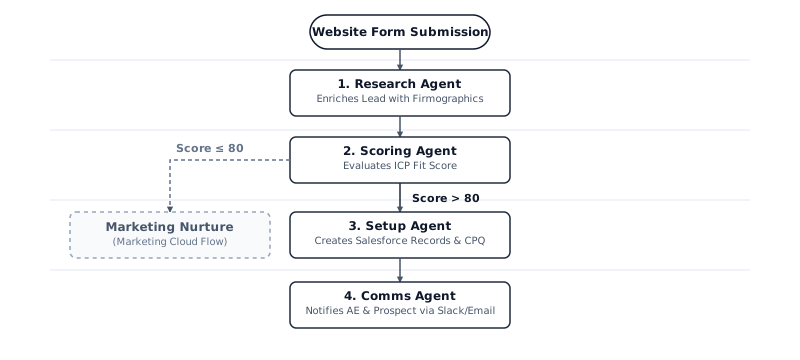
To understand how this works in practice, let us look at an automated end-to-end lead qualification and account setup workflow. The process is triggered when a new Enterprise lead submits a form on a website specifying their budget and timeline.
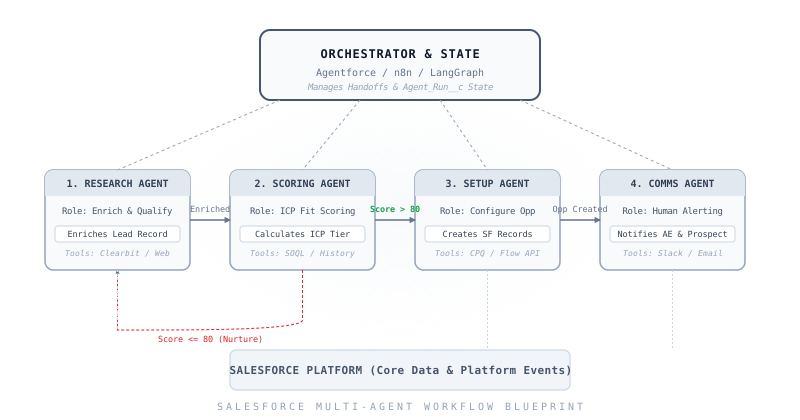
Instead of asking one massive agent to handle this entire sequence, we delegate it to four specialized agents:
1. The Lead Research Agent
- Role: Enrich and qualify the incoming lead.
- Tools: Web Search, LinkedIn API, and corporate data enrichers (like Clearbit or ZoomInfo).
- Action: Queries external databases to find the lead's company size, funding stage, and industry. It then updates the Salesforce Lead record with this enriched firmographic payload.
2. The Lead Scoring Agent
- Role: Assess if the lead matches the Ideal Customer Profile (ICP).
- Tools: SOQL queries to look up historical win/loss data for similar companies, and a custom evaluation prompt template.
- Action: Writes the calculated
Lead_Score__c and ICP_Tier__c back to the Lead record. If the score is higher than 80, it converts the Lead to an Account and Contact and triggers the next agent. If not, it routes the lead to a marketing nurture campaign.
3. The Opportunity Setup Agent
- Role: Configure the sales workspace for the account executive.
- Tools: Salesforce REST API, CPQ (Configure, Price, Quote) product lookups, and territory assignment rules.
- Action: Creates the Opportunity record, assigns the correct owner based on territory logic, initializes a draft CPQ quote template, and generates a checklist of onboarding tasks.
4. The Communication Agent
- Role: Notify both internal and external stakeholders.
- Tools: Slack MCP (Model Context Protocol), Email API.
- Action: Sends a Slack alert to the newly assigned Account Executive with a summary of the enriched research, sends a personalized introduction email to the customer, and logs all communication as Activities in Salesforce.
How Agents Communicate
For a multi-agent system to work, you need an orchestrator to manage state and context. The orchestrator is responsible for taking the output of one agent, deciding who should work on the next step, and passing the relevant context.
In Salesforce-native terms, this could be Agentforce, where handoffs are managed dynamically by a reasoning engine. In external architectures, it might be a tool like n8n, LangGraph, or Flowise, which orchestrates the execution flow by calling Salesforce APIs between agent transitions.
Salesforce-Specific Architectural Patterns
When building these workflows, you can leverage native Salesforce features to make your multi-agent architecture more secure, modular, and maintainable.
1. Platform Events as Agent Triggers
Instead of hardcoding synchronous calls between agents, use Platform Events. When the Research Agent finishes enriching a lead, it publishes a Lead_Enriched__e event. The Scoring Agent listens for this event and executes. This loose coupling makes it easy to add or swap agents in the future without breaking the overall system.
2. Custom Metadata for Configuration
Keep your agent configurations out of Apex code. Store system prompts, model selections (e.g., GPT-4o, Claude 3.5 Sonnet), temperature parameters, and enabled tools in Custom Metadata Types (CMDT). This allows admins and architects to tune agent behavior on the fly without running a full deployment.
<!-- Example CMDT Structure -->
<AgentConfig>
    <MasterLabel>Lead Research Agent</MasterLabel>
    <LLMModel>claude-3-5-sonnet</LLMModel>
    <Temperature>0.2</Temperature>
    <EnabledTools>WebSearch, ClearbitAPI</EnabledTools>
</AgentConfig>
3. Named Credentials for External APIs
Agents need to talk to third-party services. Rather than managing API keys in code or prompts, leverage Salesforce Named Credentials. This offloads token management and authentication to the Salesforce platform, ensuring your agents access external tools securely.
4. Apex as a Callable Tool
To let agents read and write Salesforce data, expose Apex classes as tools using the @InvocableMethod annotation. Write helper classes that enforce strict governor limits and object-level security.
public class SalesforceAgentTools {
    @InvocableMethod(label='Query Account History' description='Retrieves closed-won opportunities for ICP scoring')
    public static List<Opportunity> getAccountHistory(List<Id> accountIds) {
        // Run secure, governor-limit-aware query
        return [SELECT Id, Amount, StageName FROM Opportunity WHERE AccountId IN :accountIds AND StageName = 'Closed Won'];
    }
}
Where Agentforce Fits Natively
Salesforce's Agentforce platform (available starting Winter '25) provides a native environment to run these multi-agent workflows. Instead of writing custom API routing code, Agentforce uses:
- Topics: High-level categories that define what an agent is responsible for (e.g., "Lead Ingestion" or "Deal Desk").
- Actions: The actual tools the agent can use. These can be Invocable Apex methods, Flows, or Prompt Templates.
- Reasoning Engine: A built-in ReAct (Reasoning and Acting) loop that determines which action to run based on the user's intent.
To build a multi-agent system in Agentforce, you configure separate agent topics and use Handoff Actions to route control between them when a topic boundary is crossed.
Key Design Decisions
Before building a multi-agent system, there are three architectural decisions you must make. The following flowchart guides you through the optimal choice at each decision point:
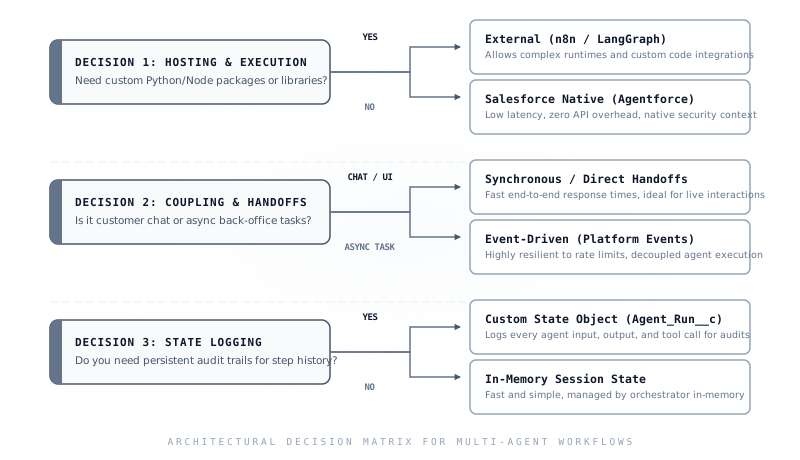
1. Hosting & Execution (Salesforce Native vs. External Orchestration)
Decide where your agents and coordination logic should live.
- Salesforce Native (Agentforce): Best when your workflows primarily query and update CRM data, and you want minimal latency with zero API overhead. Agentforce runs directly inside Salesforce, inheriting all sharing rules, object-level security, and system context natively.
- External Orchestration (n8n / LangGraph): Necessary when your agents require custom Python/Node.js runtimes, access to third-party open-source packages (e.g. advanced mathematical engines or vector libraries), or coordinate complex tasks across multiple systems outside Salesforce.
2. Coupling & Handoffs (Synchronous vs. Event-Driven)
Determine how control and data flow between individual agents in the system.
- Synchronous / Direct Handoffs: The orchestrator invokes the next agent in-memory, waiting for its response. This is highly recommended for customer-facing chat interactions or live UI helpers where real-time feedback is required.
- Event-Driven (Platform Events): Agents publish platform events (e.g.,
Lead_Enriched__e) when their work is complete, and downstream agents trigger asynchronously. This pattern is ideal for long-running, back-office workflows, ensuring resilience against governor limits and API rate caps.
3. State Logging & Audits (Custom Object vs. In-Memory)
Establish how you will track agent actions, decisions, and tool usage history.
- Custom State Object (
Agent_Run__c): Persists the input, output, token count, and API payload of every tool execution to a custom record in Salesforce. This is crucial for compliance, audit trails, and debug logging in enterprise settings.
- In-Memory Session State: State is managed only during runtime and is lost once the session closes. This provides faster, low-cost execution for simple, non-critical, or high-volume workflows where auditing isn't required.
Final Thoughts
The key to succeeding with multi-agent workflows in Salesforce is to start small. Do not try to automate your entire lead-to-cash process on day one.
Select a single, narrow, high-volume process—like Permitting Lookups, FAQ Routing, or Lead Enrichment. Build a dedicated agent, define its tools, and log its performance in a custom Agent_Run__c object. Once you have validated the reliability of that agent, spawn your second, introduce a handoff, and expand.
By building modularly, you align your AI architecture with Salesforce best practices, resulting in a system that is robust, explainable, and easy to maintain.