Multi-Framework React UI Bundles: A Salesforce Architect's Field Guide
There's a quiet tension in every Salesforce org that has grown beyond its original scope: the stack you chose versus the stack you inherited. Lightning Web Components are the official answer. But React never left the building.
Today, many enterprise Salesforce orgs run both. And increasingly, architects are being asked to formalize what was once a tactical decision into a deliberate, supportable pattern — Multi-Framework UI Bundles.
This is what that actually looks like in practice.
The Problem Space
Salesforce's UI framework story has evolved significantly. Aura gave way to LWC, which brought Salesforce closer to web standards. But LWC is still opinionated — it runs inside the Locker Service sandbox, it has its own component lifecycle, and it doesn't play natively with the broader npm ecosystem without scaffolding.
Meanwhile, your product team hired four React developers. Your design system is in Storybook. Your accessibility library of choice is Radix UI. Your data visualization layer is built on Recharts.
None of that is going away.
The question isn't React vs. LWC. The question is: how do you architect a system where both coexist intentionally, without creating a maintenance nightmare?
What Is a Multi-Framework UI Bundle?
A Multi-Framework UI Bundle is a deployment pattern where a compiled React (or other SPA framework) application is packaged as a static resource inside Salesforce and surfaced through a thin LWC host component.
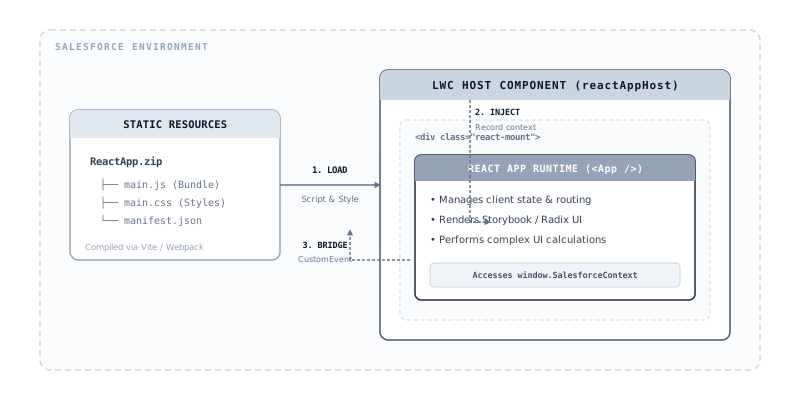
The bundle itself is a self-contained JS/CSS artifact — built with Vite or webpack, bundled for browser consumption — that mounts into a DOM node provided by the host LWC. The LWC layer handles:
- Salesforce context injection (record ID, user info, org namespace)
- Lifecycle management (connect/disconnect callbacks)
- Platform event bridges
- Navigation API wrappers
The React layer handles everything else: component state, routing, data fetching, UI rendering.
Think of LWC as the host process and React as the application runtime running inside it.
The Architecture in Practice
Here's the pattern for enterprise implementations:
force-app/
  main/
    default/
      lwc/
        reactAppHost/           ← Thin LWC wrapper
          reactAppHost.html
          reactAppHost.js
          reactAppHost.css
      staticresources/
        ReactApp/               ← Compiled bundle
          main.js
          main.css
          asset-manifest.json
The LWC host component is deliberately thin. It loads the static resource, injects a mount target <div>, and passes Salesforce context into the React app via a global namespace or custom event:
// reactAppHost.js
import { LightningElement, api } from 'lwc';
import { loadScript, loadStyle } from 'lightning/platformResourceLoader';
import REACT_APP from '@salesforce/resourceUrl/ReactApp';

export default class ReactAppHost extends LightningElement {
  @api recordId;
  @api objectApiName;

  renderedCallback() {
    Promise.all([
      loadScript(this, REACT_APP + '/main.js'),
      loadStyle(this, REACT_APP + '/main.css')
    ]).then(() => {
      const mountPoint = this.template.querySelector('.react-mount');
      window.SalesforceContext = {
        recordId: this.recordId,
        objectApiName: this.objectApiName,
        userId: window.userId  // set via Apex controller
      };
      window.ReactApp?.mount(mountPoint);
    });
  }
}
The React entrypoint reads that context and initializes accordingly:
// main.jsx
import { createRoot } from 'react-dom/client';
import App from './App';

window.ReactApp = {
  mount(node) {
    const ctx = window.SalesforceContext || {};
    createRoot(node).render(<App context={ctx} />);
  }
};
This separation of concerns is intentional. The LWC knows nothing about React internals. The React app knows nothing about LWC specifics. The boundary is an explicit contract: a DOM node and a context object.
The Locker Service Problem (and How to Think About It)
This is where architects get burned.
Salesforce's Locker Service (or its successor, Lightning Web Security) restricts cross-namespace DOM access and limits certain browser APIs. When your React bundle runs inside a static resource loaded by LWC, it lives in a specific security context.
Key gotchas:
DOM traversal is sandboxed. React's synthetic event system generally works fine, but portal-based rendering (modals, dropdowns using document.body) can behave unexpectedly. Scope your portals to the mount point, not document.body.
Global namespace pollution is risky. Avoid attaching anything to window beyond the minimum handshake surface. Use a single namespaced object (window.ReactApp) and clean it up on unmount.
Custom events crossing the boundary need care. Use CustomEvent with composed: true and bubbles: true if you need React to communicate back up to LWC. The LWC host can listen for these on the mount node.
Lightning Web Security (LWS) is stricter than Locker. If your org has LWS enabled, test early. Proxy-wrapped objects behave differently than native DOM objects, which can trip up libraries that check object identity.
Build Pipeline Considerations
A multi-framework bundle lives in two worlds: npm land and the Salesforce DX pipeline. The build needs to produce a static resource artifact that SFDX can deploy.
A minimal vite.config.js for this pattern:
import { defineConfig } from 'vite';
import react from '@vitejs/plugin-react';
import path from 'path';

export default defineConfig({
  plugins: [react()],
  build: {
    outDir: '../force-app/main/default/staticresources/ReactApp',
    rollupOptions: {
      output: {
        entryFileNames: 'main.js',
        assetFileNames: 'main.[ext]'
      }
    }
  }
});
Deterministic filenames (main.js, not main.abc123.js) matter here because the LWC references the resource by path, not by hash.
For CI/CD, the React build step runs before SFDX deployment:
# .github/workflows/deploy.yml (simplified)
- name: Build React Bundle
  run: cd react-app && npm ci && npm run build

- name: Deploy to Salesforce
  run: sf project deploy start --source-dir force-app
The static resource is checked into version control as a build artifact. Controversial, but practical — it keeps the deployment pipeline simple and avoids managing separate artifact registries for Salesforce static resources.
When This Pattern Makes Sense
Multi-Framework bundles are not always the right call. Here's my honest decision framework:
Use this pattern when:
- You have a significant React codebase that needs to live on-platform
- Your UI complexity warrants React's ecosystem (routing, state management, rich component libraries)
- You need to reuse components that also exist in non-Salesforce surfaces (a customer portal, an internal tool, a mobile wrapper)
- Your team's React expertise meaningfully outweighs their LWC expertise
Stick with LWC when:
- You're building standard record pages, list views, or forms
- You need deep Lightning Data Service integration (wire adapters,
@salesforce/schema)
- Your UI is primarily navigation-and-form, not application-grade
- You're building something that needs to be packaged as a managed package
The pattern adds complexity. Two build systems, two component models, a bridge layer to maintain. That overhead is only justified when the React side is substantial enough to warrant it.
The Bigger Picture: Composable UI on Salesforce
What's emerging in mature Salesforce orgs is a composable UI layer: LWC owns the shell — navigation, record context, platform integration — while framework bundles own the application surfaces where product complexity is highest.
This mirrors patterns from the broader web platform world: micro-frontends, module federation, island architecture. Salesforce has its own constraints and affordances, but the underlying idea is the same. You don't have to choose one framework for everything. You choose the right tool for the right surface, and you design the boundaries carefully.
The architects who get this right aren't the ones who picked a side. They're the ones who drew a clear line between platform integration and application UI — and built the bridge deliberately.