I have written before about using AI as a research partner when running numbers and testing assumptions. This post covers the other side of that equation: letting an AI coding agent actually touch the code and contet of my blog site.
My site sayeed.net is a small Next.js static site. As I detailed in the architecture behind my simple website, posts are plain MDX files in src/content/posts/, with frontmatter for title, date, excerpt, and tags. There is no CMS, no sidebar, no pop-ups, and the colour scheme is black, white, and grey on purpose.
An unchecked coding agent will erode the minimalism of your website, one helpful dependency at a time.
An agent is not a replacement for reading the diff. Think of it as a fast junior developer who never gets tired, and who will happily do exactly what you asked, even when what you asked was vague.
What a coding agent is actually good for my blog site
Simply put, small, well-scoped edits. That is the whole list, really.
It is good at drafting a new MDX post in the existing format, fixing a typo across files, renaming a tag consistently, or adding a small component that follows an existing pattern. It can hold the shape of your project in its head and repeat it when ask to create or format the next blog post.
What it is not good at: deciding scope. In my post the four stages of AI-assisted coding, we noted how discipline dictates code quality. Give an agent "improve the blog" and it will improve it in ways you never asked for, introducing an unneeded library, a new layout, or a complex theme system. Give it "format my post, follow the existing blog format at my site and do not change anything else" and it stays useful.
The setup I use
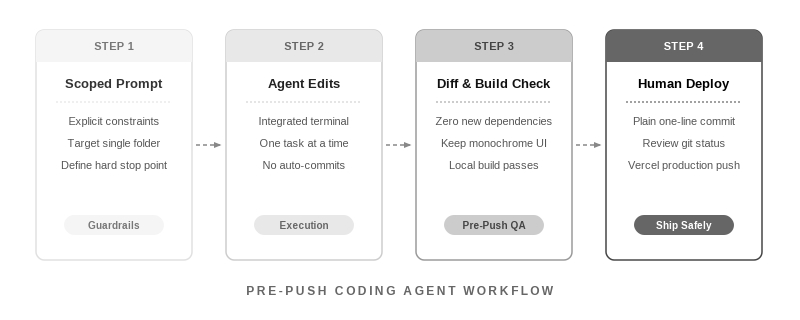
I use Visual Studio Code, GitHub, and Vercel. The workflow is deliberately boring:
- Open the repo in VS Code.
- Run the coding agent in VS Code's integrated terminal, in the project folder.
- Ask for one change at a time.
- Review the diff in VS Code.
- Run the build locally.
- Only then commit and push. Vercel deploys the changes to my blog site from that push.
Nothing in that list is automatic. In particular, the agent does not commit or push for me.
Just this rule has saved me from more bad deploys than any other.
The prompt that works
Vague prompts get vague, sprawling diffs. This is the shape that works for me:
Add a post to src/content/posts/ in MDX. Use the existing frontmatter
fields and style. Keep the design minimal, black/white/grey only,
no sidebar, no pop-ups.

Do not change the sitemap, canonical host, or existing posts.
After writing, run the build and fix any build errors, but do not
commit or push until I review the diff.
Notice what that prompt does. It names the folder, the format, the constraints, the things not to touch, and the stopping point.
Beyond this point, I edit the content manually and ask agent to rephrase and proofread my mdx filesThe stopping point matters most. An agent with no stopping point will keep "helping" until your simple site is no longer simple.
My pre-push checklist
I run through this list which is non-negotiable for me before anything goes to GitHub, every time:
1. Read the whole diff
Do not just look at the new file. Check the entire git diff. Did the agent touch files you did not ask about? If yes, revert those changes immediately:
git restore src/app/globals.css
git status
2. Check for new dependencies
A blog post should not need a new npm package. If one appeared in package.json, ask why, and usually remove it. Most styling and interactive needs are easily handled with existing project utilities.
3. Check design constraints
Still black, white, and grey? Verify no foreign accent colors, web fonts, or unwanted layout containers slipped into the markup.
4. Check frontmatter integrity
Review title, date, excerpt, and tags. Ensure tags reuse existing vocabulary. Dates are the quiet killer here: a listing date and a post date that disagree by a day will confuse readers and search engines alike.
5. Run the build locally
If it does not build on your machine, it does not get pushed:
npm run build
Catching broken JSX tags or missing image paths locally prevents failed production deploys on Vercel.
6. Check for secrets
Ensure no API keys, tokens, or personal paths exist in the diff. An agent will not leak these on purpose, but it will happily copy a configuration file you pointed it at.
7. Commit with a plain message
Write what changed in one concise line. The agent's auto-generated summary is not the commit message unless you explicitly agree with it.
If any item fails, I fix it myself or ask the agent to fix that one isolated item, not to "fix everything."
Where to stop trusting it
An agent can draft, refactor, and follow a pattern better than most people expect. It cannot decide what your site is for, what your taste is, or whether a change is worth shipping.
It also cannot tell you that a dependency it added will be unmaintained in a year, or that a "small improvement" contradicts your design principles.
Just as with implementing guardrails for developer workflows, keeping human judgment central is what makes coding agents reliable. Treat every diff it produces as "review this," not "ship this."
The value is not in the lines it writes, but in the time saved on mechanical chores, leaving your attention for what actually needs judgment: the idea, the argument, and the final edit.